
Why these four perspectives? What do we map inside? How to come up with the relevant goals? Part 1 >




The difference between perspectives. Examples of the goals and indicators for each perspective. Part 2 >
Part 1: Understanding Balanced Scorecard
What is a Balanced Scorecard?
It is a strategy execution framework developed by Robert Kaplan and David Norton. In this article, we will be talking mostly about its four perspectives.
- In a different article, we analyzed the advantages and disadvantages of the framework.
Three Principles to Follow When Mapping Goals into Perspectives
Here are the general principles to follow when building a strategy scorecard with four perspectives.
1. Follow Cause-and-Effect Logic Between Perspectives
The perspectives of the Balanced Scorecard are not just the visual containers for the goals – they help to explain the cause-and-effect logic of the strategy.
The logic flows from bottom to up: goals from the lower perspectives contribute to the goals from a higher perspective.
 Four Perspectives Example.
Providing customers with what they need (
Customer perspective) results in the financial outcomes ( Finance Perspective), not vice versa.2. Map Business Goals – The Educated Hypothesis
The fact that we connected a goal from the
“Internal processes perspective” with another goal from the
All goals are the hypothesis that we need to confirm.
3. It Is NOT About Indicators: Start with Goals, Align KPIs Later
Those are KPI Scorecards. They help to measure many aspects of the business but don’t shed light on what strategy is and how it will be executed.
Align indicators with the goals on your map, and make sure that indicators are not dominating your scorecard.
Business goals should dominate it.
How to Come Up with the Goals
We map business goals into the four perspectives of the Balanced Scorecard. How do organizations come up with these goals? Here are some suggestions.
Project Three Generic Strategies
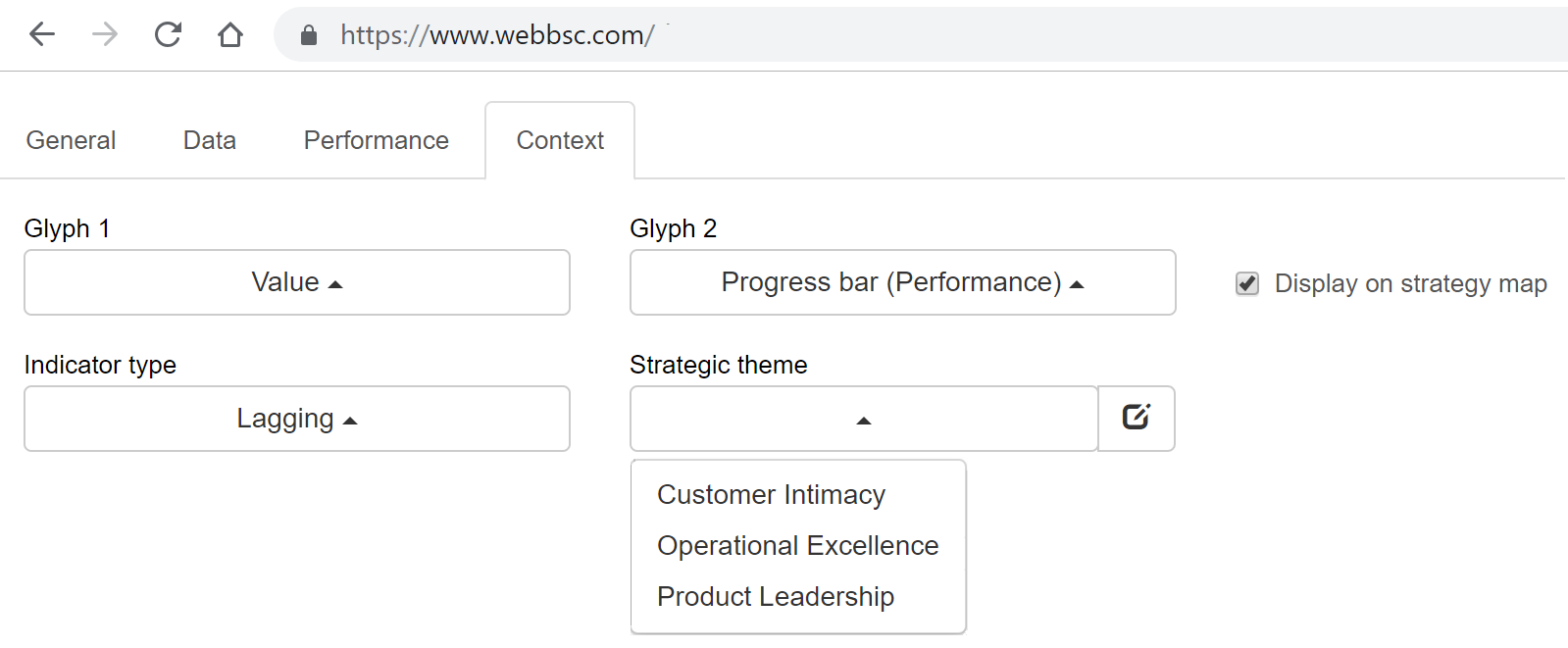
The three generic strategies of Balanced Scorecard (or similar Porter’s generic strategies) are:
- Product Leadership Strategy (building the franchise)
- Customer Intimacy Strategy (increasing customer value)
- Operational Excellence Strategy (achieving operational excellence)
One way to formulate a goal is to project one of the generic strategies on your current business challenges.
In the article below, we will be using this technique often.
Map Value Chain, Cost Centers, and Key Processes
The Balanced Scorecard is normally created for an existing business.It is a good idea to understand beforehand:
- What this business is about,
- How the value is created,
- Where are the main costs?
For example, we followed this approach when designing the Balanced Scorecard for customer service. We started by mapping key processes, costs, and main growth points. There is a video tutorial that explains the details.
The Perspectives Are for the Strategic Goals
It sounds like a truism, but on the Strategy Scorecard, we are supposed to map strategic goals. We discussed before the difference between strategic and operational goals. My short recommendation would be to focus on the goals that would impact the performance of the organization long-term.
Good Goals Starts with Analysis of the Challenges
A good goal responds to some challenge.
Therefore, to come up with a good goal, we have to analyze the challenge behind it:
- Analyze its reasons,
- Possible response plan,
- Alternative solutions, and
- How all these ideas can be aligned with the strategies you already have.
That’s a short version of the strategy journey approach that we discussed before.
Why Do We Have These Four Perspectives?
The need to use four perspectives and specifically these very perspectives can be proved in practice. Check out the workshop example that we discussed in the “CEO Scorecard” article.
- The idea is that businesses by definition work to get financial outcomes (the non-profit case was discussed separately) that leads to the need for the Finance perspective.
- The financial outcomes are the result of solving customer´s problems, which is the reason to have the Customer perspective.
- To satisfy the needs of the customers, the business has to do something, and that’s the Internal perspective.
- Finally, the needs of customers, the technology, and the environment are constantly changing, and that’s why the business needs to update its skills regularly; it needs to learn new concepts and forget less useful ideas. That’s the Learning and growth perspective.
Are there some alternative approaches?
If the cause-and-effect logic remains untouched, we can say that we are still talking about Balanced Scorecard. For sure, there are some experiments that have little to do with a K&N Balanced Scorecard like for example, Tesco´s scorecard or a scorecard with 12 perspectives.
To have a full picture about the viable alternatives, we asked independent Balanced Scorecard consultant James Creelman:
There are several emerging versions of the Balanced Scorecard that are worth looking at: most notably in my opinion the Value Creation Map pioneered by the Advanced Performance Institute in the UK.
The scorecard also works well alongside frameworks such as Malcolm Baldrige or EFQM.
Obviously, the Balanced Scorecard is not the only framework that addressed the problem of strategy execution:
- In 1982 (10 years before the BSC), Tom Peters and his colleagues suggested a simple, yet powerful 7-S framework
- In 1954, Peter Drucker shared in “The Practice of Management” his MBO framework
- First employed by Intel in the 1970s and later popularized by John Doerr, the OKR framework is now used in many tech companies
What’s the Benefit of Having a Strategy Map?
The key benefit of using these four perspectives and the Balanced Scorecard strategy map is that we can describe a strategy effectively. Strategy “dump” term is also getting popular, especially in the IT companies.
Once there is a “dump” of strategy on a strategy map with four perspectives, it is much easier to discuss and share this strategy.
Part 2. Four Perspectives of the Balanced Scorecard
Below, you will find a detailed analysis of the four perspectives of the Balanced Scorecard.
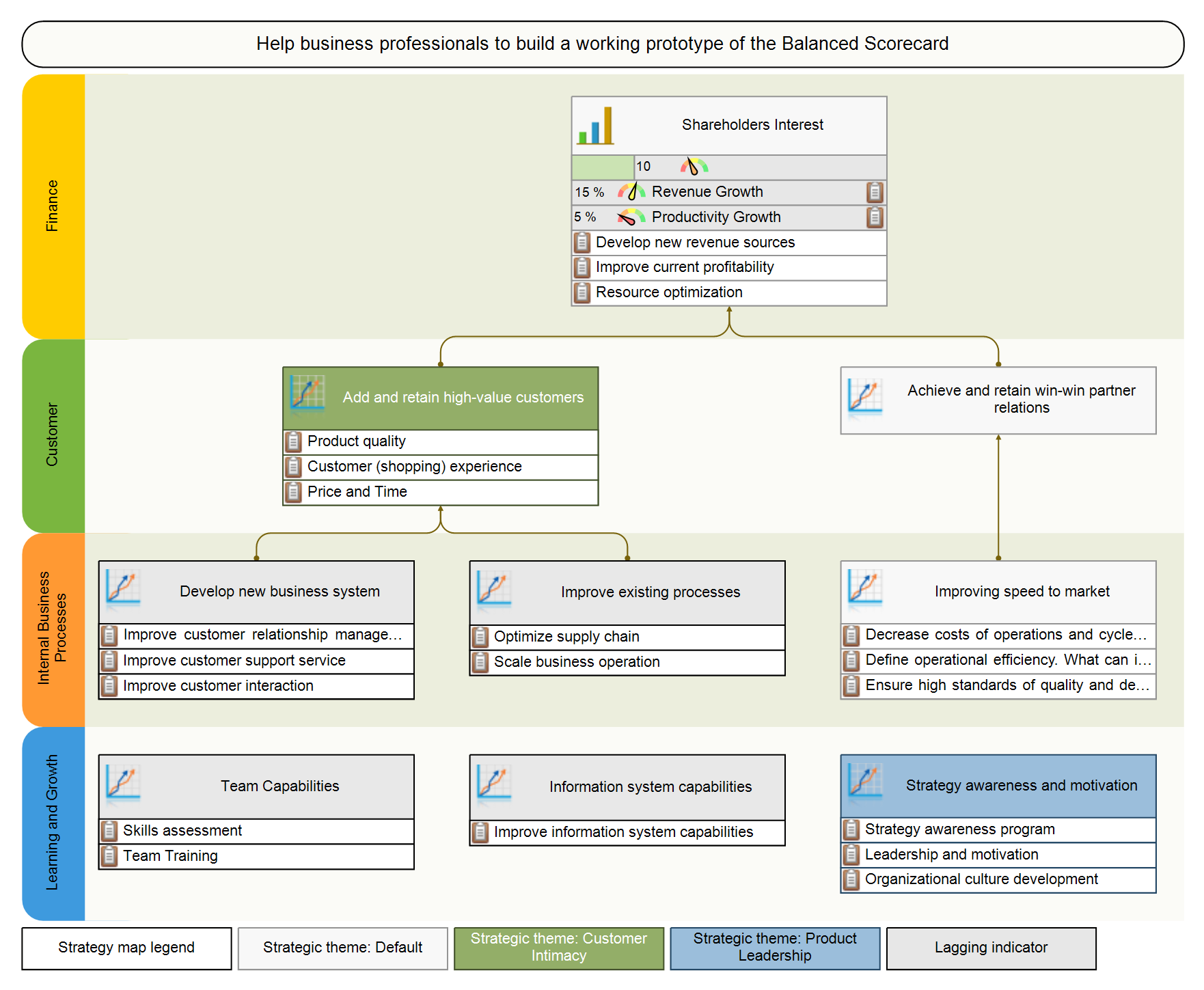
Four BSC Perspectives. Financial Perspective. How it’s supposed to work for non-profit organizations, how to cascade financial goals, not all finance-related metrics should be placed here.
Customer Perspective. Internal and External Customers. Formulating a customer’s problem, not what the organization wants from the customers. Measuring perception.
Internal Perspective. Analysis of strategic themes. Linking internal goals to what customers need. The danger or binary indicators.
Learning and Growth. Improving skills and capabilities. Working on the culture. How to quantify and measure intangible goals like leadership training.
We discuss typical challenges for the goals and performance indicators as well as ways to solve them.
Financial Perspective or Stakeholders’ Interests Perspective
Map here the goals related to the stakeholders´ interests. In other words:
If we satisfy the needs of our customers, what outcomes will our stakeholders see?
Goals to Map in the Financial Perspective
What are the typical financial goals of the for-profit organization?
- Improve profits goal that naturally includes
- Increase revenue, and
- Cut costs.
By applying three generic strategies, we can also focus on:
- Developing new revenue sources by creating new products and services. This is primarily a projection of the Product Leadership strategy.
- Improving current profitability by working on customer value proposition. This is primarily a projection of the Customer Value strategy.
- Resource optimization by decreasing costs, sharing resources and technologies between departments, or achieving economic outcomes by scaling production. This is a projection of the Operation Excellence strategy.
Financial Perspective for Non-Profits
Still, non-profit organizations have stakeholders; for example, the members of the community that founded the organization.In this case, the financial perspective is actually a “Stakeholder Interests” perspective or “Success” perspective. Instead of mapping financial goals, we will map there some social, cultural or political objectives.
| Organization type | For-profit | Non-profit |
|---|---|---|
| Type of objective | Financial objectives | Cultural or social objectives |
| Perspective name | Financial perspective | Success or Stakeholders’ Interests Perspective |
| Term for stakeholders | Shareholders | Stakeholders |
Cascading Financial Goals to Lower Levels
Financial goals might make sense on the level of CEO scorecard. What about lower levels?
Imagine the CEO of a software development company who decided to “Cut development costs by the end of the year by 15%.”
Let’s breakdown this goal into the components…
Here is what we actually have here:
- Goal: “Cut development costs”
- Metric: “Annual saving, %”
- Target: 15%
The hypothesis might be that they can contribute to cost saving by increasing the effectiveness of software testing and, as a result, decrease the number of testers needed.The goal on their scorecard will be formulated as:
- “Decrease the number of testers by 30%”
Where should this goal be placed on the local scorecard of software developers?
That’s a good question, so let’s analyze the options that we have:
(a) Put it in the “Finance” perspective – it might be confusing as it has nothing to do with finance, at least software developers don’t perceive it in this way.(b) Rename the “Finance” perspective into “Stakeholders’ Interests” like we did for non-profit organizations and put the goal there. It makes more sense.
(c) Put it into the “Customer” perspective as the CEO is one of the “internal” customers.
(d) Put in into the “Internal” perspective. This won’t work for me. I would agree to map in Internal perspective something like “Implement automated tests” that supports “Decrease the number of testers” goal from the above standing perspectives.(e) Put it into the “Learning and Growth” perspective. As for the previous one, here we can map some supporting goals like “Research ways to optimize testing” but not the “Decrease the number of testers” goal itself.
I believe options (b) and (c) are the most viable. The specific choice depends a lot on how organizations cascade their strategy. We have discussed 12 examples of cascading – there you can find an approach to cascading that will work for your organization.
Map Goals to Establish Priorities
They are, but:
The priority of one goal over another might be different in specific cases.
For example, there might be simply no grow points for the developing new revenue sources (your team doesn’t have resources for this, or stakeholders are willing to focus on the main product only).
An organization should prioritize their strategy accordingly, and more importantly, the organization should explain those priorities to their employees. That’s why we design a strategy map.
Not All Financial Goals Belong to the Finance Perspective
What about other goals from the financial domain like “debt optimization”?Should it be on the Financial perspective or somewhere else?
The financial nature of this goal is making this confusing.
A good question to ask is whether this is what your stakeholders want from your business?
My best guess is that the stakeholders want to see a financially stable business, but most likely they don’t care (and don’t have any control) about specific financial instruments.
I would suggest mapping a goal like ¨dept optimization¨ somewhere in the Internal perspective, while the connection for this goal in the Finance perspective might be via some umbrella goal like “Improve financial stability.”
Another example is the “Raise Funds” goals for a non-profit organization.Should it be on the stakeholder’s perspective or somewhere else?
My logic, in this case, is that the funds raised are not the final desired outcome for the non-profit organization.While the goal looks like a financial one, it doesn’t belong to the Stakeholders’ Interests perspective, but to the Customer perspective (think about partners who will able to act when they have enough funds) or the Internal perspective.
Customers Perspective
Authors of the Balanced Scorecard concept 1 formulate the question of the customer perspective in this way:
To achieve my vision, how must I look to my customer?
Looks simple right?
According to what we see daily, the “Customer” is one of the most problematic perspectives of the Balanced Scorecard framework.
- The concept of “customer” is limited to end-users only, ignoring internal customers and partners.
- Strategists tend to confuse the needs of the customers with what the organization wants customers to be.
Below I suggest discussing these two pitfalls in detail.
Who are the Customers? Internal and External Customers
Let’s start with an obvious answer: customers are the end-users who pay for our products or services. That’s very close to the definition that, for example, Investopedia gives.
They are not paying for the product yet… It appears that:
- The criterion for being a customer is not always about monetary exchange, and
- The service provided is also not always that obvious (think about social media like Facebook and the problems that they solve).
The definition of customer from Wikipedia works much better in this case – a customer is a recipient of what is provided by a vendor.
Let’s have a closer look at the relationship that an organization typically has with its partners:
- They do some ads targeted to the partners,
- They organize conferences for the partners,
- They work to retain long-term relationships.
Sound familiar?
Partners are the customers of the organization as well.
Let’s take an IT business unit as an example. They normally don’t interact with end-users directly, but still, they have many customers – internal ones.
The scorecard for IT will be focused on serving those internal customers.
Let’s summarize the ideas about customers.
We can agree that there are:
- External customers – end-users of the product and partners, and
- Internal customers, for example, the marketing department is an internal customer for the IT department.
Make sure you reflect (or imply) the goals for all customer types in the Customer perspective.
Map What Customers Need – Not Want You Want from Them
Map here what your customers want from your business but not what your business wants from them.
What is it all about? A company wants its products to be more visible in the market. Is it the customer’s aspiration? Not exactly; a customer would never formulate it in this way!
Let’s look at this goal from the customer’s point of view.
I’m a customer, and I’m looking for some good products to solve my challenges. I’m trying to find the product, but I’m not satisfied with the options I have. After a few hours of research, I’m happy to finally find the product that matched all my needs. I wish it could be easier to find such an excellent product!
From the customer’s point of view, the same goal can be formulated as:
- “The product perceived as market leader.”
or
- “The product looks like the best solution for ABC problem.“
It’s the variation of the same goal, but now we have reformulated it in a way that customers actually perceive this goal. Off course, this is our hypothesis, and it’s better to support it with some studies.
- Company: “Increase market presence.”
- Customer: “The product looks like the best solution for ABC problem.“
This looks like a mental trick, but it works.
The goals formulated from the customer’s point of view are more realistic; their essence is not hidden behind business jargon.
Phil Jones in his Excitant blog 2 illustrates this idea on the example with a Strategic Balanced Scorecard in Hospices:
- “It (the customer perspective) should contain “what they want.” It should not contain what you are planning to do to deliver what they want but should clearly state their needs from their perspectives.”
A Template for the Goals of the Customer Perspective
Based on three generic strategies, we can formulate three themes for the Customer perspective:
- Product quality – a projection of product leadership strategy
- Customer (shopping) experience – a projection of customer intimacy strategy
- Price and Time – a projection of operational excellence strategy
These themes can be applied to different stages of customer relationships with an organization:
- Customer acquisition
- Customer satisfaction
- Customer retention
- Customer profitability
- Market share
To make things easier, we can present themes and stages of a relationship with customers in this table:
| Theme\Stage | 1. Acquisition | 2. Satisfaction | 3. Retention | 4. Profitability | 5. Market share |
|---|---|---|---|---|---|
| Product Quality | |||||
| Customer Experience | |||||
| Operations (price, time) |
By matching the “theme” column and “stage” raw, we can focus on different strategies.
Tim O’Reilly shared a detailed analysis of startup strategies 3, including Blitzscaling. Take AirBnb as an example; they obviously focused on market share doing it before competitors would copy them in Europe.What is a good strategy for a more classical business model? Taking into account that customer acquisition costs 5-25 times more 4 than customer retention, I would suggest aiming to achieve excellence in customer retention first.
How to Find Customer Goals for Your Organization
Start with an analysis of your current challenges. Draw your business model:
- Map the sources of the leads
- Map income and costs centers
- Map the points of customer engagement
Get back to the stages of the customer journey and analyze conversion rates between these stages:
- Find what’s working properly and what needs to be improved.
- Analyze where your product wins and loses to the competitors.
The result of such analysis will be a hypothesis that you could formulate in the Customer perspective.For example, you might detect that your prospective users are not converting well into paying users. That’s how you see this challenge.
Look at this hypothesis from the customer’s point of view.
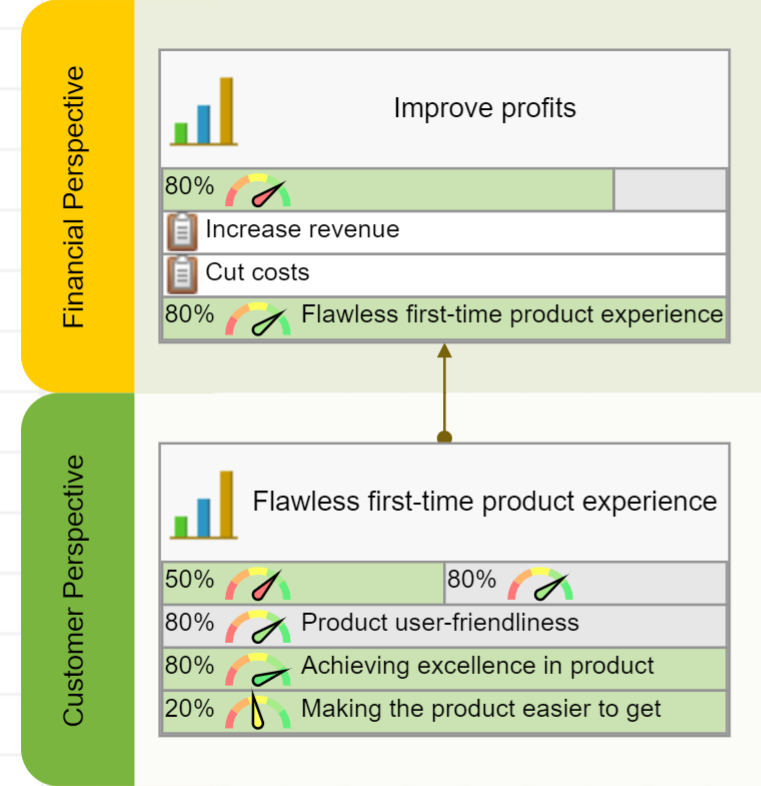
New customers want to have a “Flawless first-time product experience.” This can be a good goal for the Customer perspective. We will develop this example further in the Internal perspective below.
KPIs for Customer Perspective: Quantify on Perception
Customer perspective is that they are normally vague and hard to measure.Customers want:
- “Better Products,”
- “High-quality Products,”
- “Easy-to-use Products”
– all these are good goals, but they are hard to quantify in the form they are presented now.
The solution is to quantify the perception of the goal.
Let’s take the “Easy-to-use Product” goal as an example. We can come up with some objective criterion of user-friendliness, but that’s not what end-users need. The trick is to understand how customers perceive this goal. We have discussed some ways to approach this challenge when we were talking about complexity metrics.
- The user-friendliness of the product might actually be perceived as product experience within two minutes when the customer is trying the product for the first time.
Instead of measuring the vague context of “easiness,” we could focus on some specific steps that lead the customer to unlock the value of the product.
In “The Strategy Focused Organization,” authors share an example of Charlotte City Council’s Strategy Map, where one of the objectives in Customer perspectives is formulated as “Increase the perception of safety.”
It is “increase the perception of safety” not “increase safety”! Instead of focusing on the vague concept of safety, the priority was on understanding how inhabitants perceive safety and improve accordingly. Additional metrics, like the ones we discussed here, will obviously make the context of safety even more specific.
Perception of Quality – Healthcare Example
Another typical example of how the service is perceived is customer satisfaction in healthcare 5.
Customers rate higher those doctors who were more attentive, rather than those who were able to provide a better medical solution.
The reason is obvious: patients are not able to recognize good service from a medical viewpoint, but they could recognize excellence in general care.The quality as perceived by the end-users is important. Also, we should remember other stakeholders. In the case of healthcare, those will be the doctors, the professional organizations, the regulators; their perception of the quality will be different. Some of these ideas were reflected on the scorecard a hospital.
Internal Processes Perspective
This perspective explains how the company is going to satisfy customer needs and meet financial goals.
Make sure that the goals from the
In other words, you are doing something inside your business not because you can, but because your best-educated guess is that it will lead to satisfying the needs of the customers.
How can an organization satisfy the needs of the customers? It can do it by either:
- Improving existing business systems
or by
- Implementing new business systems.
Again, three strategic themes will help to prepare a framework for brainstorming the goals for this perspective. Let’s review them one by one.
Product Leadership Strategic Theme
As the name of this strategic theme implies, the objectives are focused on:
- Developing new products
- Innovating existing products
- Improving speed to market
Decide what goal to map depending on where your business is now.
| The state of the organization | Suggested action |
|---|---|
| You know what your customers need | Map specific goals to develop new products or features. |
| You have many ideas, but you’re not sure which one should be the focus | Map the goal to implement a systematic approach to innovations. Having a separate scorecard for innovations is a good idea. |
| Have no ideas yet | You don’t have enough information to decide, but you probably know what pieces are missing. Focus your learning and growth efforts respectively. Formulate questions that would clarify what your priorities should be. |
Customer Intimacy Strategic Theme
Have a look at your Customer perspective. Do you have some goals related to the customer service there? Here is a framework for addressing those goals:
Roberto Verganti illustrated this idea in “Steve Jobs and Management by Meaning” 6:
“Apple’s approach to innovation is definitely not user-driven: It does not listen to users but makes proposals to them.”
How are you going to listen to your customers? Will you do it in Apple’s style?
Operational Excellence Strategic Theme
This strategic theme focuses on running a business efficiently. The questions to ask are:
- What can a company do to decrease costs of operations and cycle time?
- How does a company define operational efficiency? What can it do to improve it?
- How can a company ensure high standards of quality and delivery time?
- How can a company optimize its supply chain?
- How can a company scale business operation?
An Example of the Goals for Internal Perspective
Let’s get back to the example that we started discussing in the Customer perspective. After some analysis, we found out that the customers want to have a “Flawless first-time product experience.”
What could we do internally to ensure this experience?
In our case, it was a real situation. One day, our team discussed this question.
We focused our internal goals on two challenges:
- Making the product easier to get started (anticomplexity was one of the main themes for product development).
- Achieving excellence in product tutorials (now we have video tutorials for all features of the product).
We focused on these goals because we saw how they contribute to the goals from the Customer perspective, and later we were able to confirm those improvements by the performance metrics.
Shifting Focus from One Strategy to Another
Michael Porter talked a lot about the need for the focus in the strategy.
KPIs for Internal Perspective: Avoid Binary Indicators
The most typical measurement error for the Internal Perspective is the use of binary or checklist-style indicators.
A binary indicator is one that has two possible values, it is a checkbox with two states – “unchecked” and “checked.”
For example, the goal “Implement CRM” can be measured by a binary indicator. Did we implement CRM? The answer can be “yes” or “no.”The problem with binary indicators is that they don’t give us much control over what is happening. Their function is limited to informing the team about the fact that something has been accomplished or has not been started yet.
The “Implement CRM” goal is not ambitious enough for a strategy scorecard.
Convert short-term goals into initiatives.
Look at the new goal “Engage with Customers Effectively.” Does the binary metric “Implement CRM” make sense now? No, we need to focus on the engagement metric instead. The engagement metric will show how the new CRM improved customer behavior is used.What about “Implement CRM” – if it is not strategic enough to be on the Balanced Scorecard, where should we put it then?
The answer is simple: in the supporting documentation or the initiatives aligned with the goal.
Learning and Growth Perspective
The workshop exercise discussed above shows that CEOs agree on the importance of tracking the pulse of the industry and keep learning.
Learning and Growth perspective, we focus on the intangible aspects of the business – skills of our team and our culture.The framing question for this perspective is:
How must the company learn and improve in order to achieve its vision?
The three themes for the Learning and Growth perspective are focused on:
- Employees Capabilities,
- Information Systems, and
- Strategy Awareness and Motivation.
Below, we discuss them in detail.
The cultural component on the
For example, one of the goals of the Learning and Growth Perspective might be to promote and implement into the company’s DNA:
- Continuous improvement via Plan-Do-Check-Act cycle or
- Implement proper performance measurement culture.
KPIs for Learning and Growth: How to Measure Intangible
Formulating bold goals for the Learning and Growth perspective is never an issue. Companies like to verbalize their aspirations about culture and leadership.
Where is the problem then?
The problem is that intangible ideas like skills or culture are hard to quantify and measure.
Very often, top managers are fooled by various performance metrics that do nothing but indicate that, for example, a company paid for another expensive training.
Process metrics are input/output metrics for the goal that have little to do with success factors and expected outcomes.
Measurement is easy if you did the mapping of the goals right:
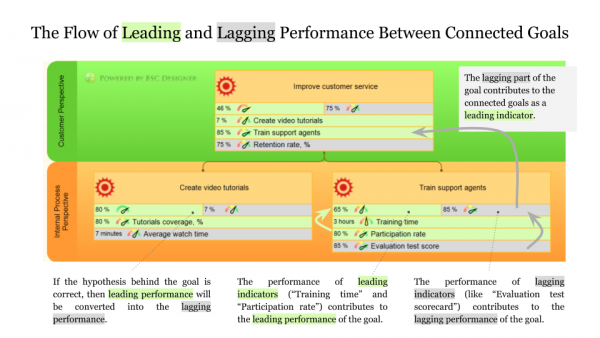
- The goals from the Learning and Growth perspective will contribute to the leading performance of the goals from the Internal perspective.
- The lagging performance of the goals from the Internal perspective will contribute to the leading performance of the goals from the Customer perspective.
- Finally, the lagging performance of customer goals will contribute to the stakeholders’ goals.
That’s a natural flow of the performance that we discussed in the Scorecard 101 article.
Obviously, there could be more leading metrics on all levels that will provide additional views on the performance of the goals.
Use Cases
Learn from other users of BSC Designer.
- I am trying to understand BSC via the BSC Designer. It seemed to me that I can learn from BSC Designer more than what I have studied in different costly courses. >
BSC Designer is great tool to start implementing the Norton & Kaplan Balanced Scorecard with a more sophisticated approach than an Excel spreadsheet. >
- It could address general management topics for which the traditional Norton-Kaplan approach is used, but also more specific like building a scorecard for the IT department. >
We use BSC Designer to make a synthesis of a dynamic view of KPIs according to Kaplan and Norton Balanced Scorecard (BSC).This product is easy to use, it has a good interface for a quick understanding of BSC concept. >

- This tool does not require IT expertise but provides a correct methodological approach, can help to move from approach to implementation of NORTON/KAPLAN ideas. >
The BSC Designer price is very fair. The main advantage that I found is that BSC Designer applies the methodology of Norton and Kaplan in a very user-friendly manner. >
- Teaching BSC concepts with your products has been very easy since you have been able to present a product that can be used at various levels of complexity. >
Questions & Answers about the Balanced Scorecard
Here is a compilation of the most frequently asked questions about Balanced Scorecard and KPIs; hopefully, my answers will help you to get on the right track with the framework.If you ask a business professional about the Balanced Scorecard, then in 95% of the cases, you will hear that it is about “balancing” Key Performance Indicators within 4 perspectives. With these misleading ideas, people start implementing the framework, fail to do so, and come to the conclusion that the Balanced Scorecard is not for them.
What is a Balanced Scorecard?
A short answer is, it is a strategy execution framework. Having said that, we need to understand that there is no universal agreement, either about what strategy is or about the ways to track its execution.
Sometimes the Balanced Scorecard is defined as a means to articulate strategy, translate it to the line level employees, and ensure that those ideas are executed successfully.
Is it “Balanced Scorecard” or “balanced score card?”
The correct spelling is “Balanced Scorecard” or “BSC.” Wrong spelling: balanced scorecard (lower case), Balanced Score Card, BSc, bsc.
Who are the authors of the Balanced Scorecard?
The idea was first suggested in the early 1990s by Drs. Robert Kaplan and David Norton. The website of Balanced Scorecard Institute is a must-visit reference point for historical information, as well as for practical advice on BSC.
Who uses it?
Any organization has a strategy, even small businesses and individuals, so with some modifications, the Balanced Scorecard can be used by any organization, including non-profits. According to a study by the Gartner Group, over 50% of large organizations have adopted the Balanced Scorecard.
Why do businesses use it?
The root of the problem is that the strategic picture in the minds of top managers is not the same as a picture in the minds of line-level employees. Studies by the Balanced Scorecard Collaborative report show that more than 95% of employees don’t understand an organization’s strategy. This leads organizations to a less effective and efficient execution.
Balanced Scorecard supposes to help fix this problem by aligning top-level goals with line-level actions, and thus make the strategy execution process more trackable.
Here, we have more facts about the Balance Scorecard that shed light on how widely it is used and what problems it solves.
Is it about Key Performance Indicators?
In its earlier versions, it looked more like a performance measurement framework where measures (not necessarily the key performance indicators) played a significant role. Now the measures are responsible for tracking strategy execution, but I’d say that the main part is a strategy map with business goals connected by cause-and-effect links. The metrics are still there, but they are not the main goal of the game.
What are the key principles of the Balanced Scorecard?
I’m simplifying, but in my opinion, these are three most important principles:
- Cause-and-effect relationship between objectives
- Showing how customer value is created and how it is linked to the organization’s goals
- Aligning measures and initiatives with objectives
Find a more detailed review in this article.
What is the Balanced Scorecard process?
It varies from business to business and from consultant to consultant. Here is the one that we recommend for the Balanced Scorecard.
What if a company has a Balanced Scorecard with many KPIs, but without a strategy map?
Balanced Scorecard is a buzz word. As with any buzz word, some confusion is inevitable. A set of 100+ KPIs is not a Balanced Scorecard; it is a KPI scorecard. It would be more correct to call those business tools a dashboard or simply a scorecard. Here, the difference between a dashboard and a scorecard is explained.
Are there any approaches similar to the Balanced Scorecard?
Business executives always use a combination of several tools. There are frameworks that address the problem of strategic planning and execution: Hoshin Kanri, 7-S, OKRs, Business Model Generation (see the book by Yves Pigneur and Alexander Osterwald). And for sure, there are many more supporting tools like SWOT, gap analysis, risk assessment, etc. In practice, there is always a mix of different business tools.
Do I need software to work with the Balanced Scorecard?
In my opinion, the answer is “yes.” Otherwise, you are at risk of spending more time on the design and might face motivation problems. Check out our shopper’s guide for the strategy execution software.
A common sense note: before getting to the automation tools, you need to be sure about your strategy and business goals.
What’s the biggest challenge about the Balanced Scorecard? How can you solve it?
According to our informal surveys, the biggest challenge is motivation to start using and keep using the Balanced Scorecard. In this article we discussed how to solve the problem. Another big challenge is to find proper performance measures (see the next question).
How can you find the right KPIs for the scorecard?
First, it is a good idea to understand the difference between metrics, measures, and KPIs. The biggest mistake would be to take performance indicators from some list on the Internet. Instead, focus first on the business goals, and indicators will appear naturally. Here is the process for the KPIs that we recommend.
What does Balanced Scorecard cascading mean?
The idea of cascading (in the case of the Balanced Scorecard it’s also called “alignment”) is about translating top level objectives down to the lower levels (and vice versa). The key idea is that cascading is done by business goals, not by KPIs. Here, you will find examples of some typical approaches to the cascading.
How to use Balanced Scorecard for …?
There are no specific rules for specific business niches. The guiding ideas that strategists use for a retail company are similar to the ideas that one will use for a hotel business. Still, having some examples is always a good idea. We have some here.
Do you have more questions? Feel free to ask in the comments. Balanced Scorecard experts are welcome to add their thoughts in the comments.
How to Create a Balanced Scorecard
Here is a summary of how to create a professional Balanced Scorecard.
- Define mission and vision
- Define top-level priorities or strategic themes
- Map business goals in the four perspectives
- Link goals by cause-and-effect connections
- Add relevant KPIs and initiatives
Takeaways
Let me summarize the key ideas of the article.
- There are four perspectives. The need to use this very order and this very number of perspectives can be proved in practice.
- Cause-and-effect logic is crucial. Learning and Growth contributes to the Internal perspective, the Internal perspective contribute to the Customer, the Customer perspective contributes to the Stakeholders’ Interests perspectives.
- The Stakeholder perspective is a safer alternative to the Finance perspective. The Stakeholder perspective will work better for non-profit organization as well as for the scorecard cascading.
- The Customer perspective is to map the needs of the customers. A typical mistake is to map the aspirations of the company about their clients instead.
- Goals from the Internal perspective should support Customer goals. In other words, your organization needs to solve problems that matter to your clients, not just solve some problems.
- Learning and growth perspective. Includes goals for intangible assets like skills and culture. Those goals are crucial for the long-term survival of the organization.
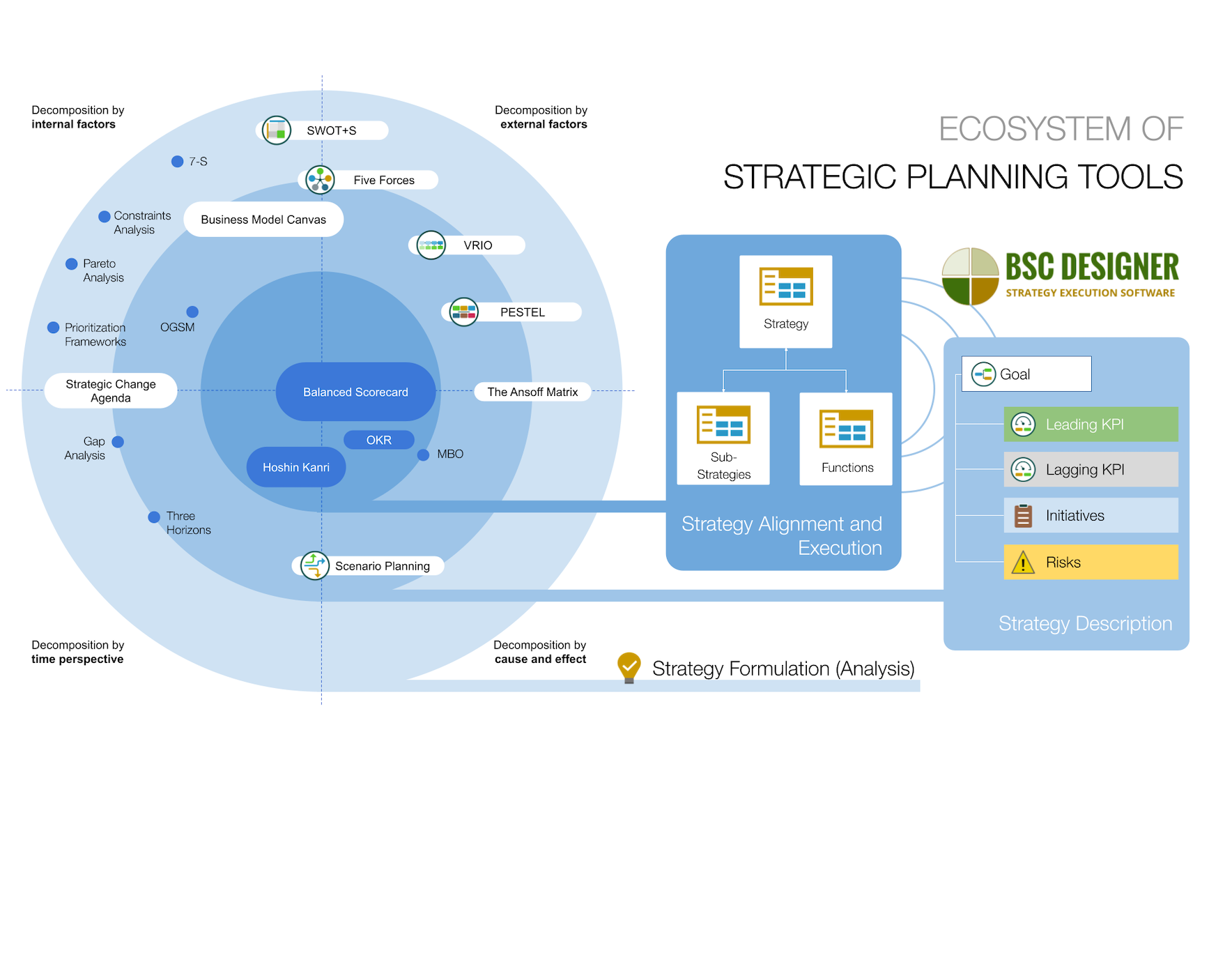
Comparative Table of Strategic Planning Frameworks
- Strategy execution frameworks. Such as the Balanced Scorecard for the overall strategy and the more lightweight OKR framework for specific challenges.
- Strategy formulation frameworks. SWOT, Three Horizons, Constraints Analysis, PESTEL, Gap Analysis, etc. that help organizations to generate new ideas.
- The Strategy Focused Organization, Robert S. Kaplan, David P. Norton, Harvard Business School Press, 2001 ↩
- Strategic Balanced Scorecards for Hospices: Some advice from experience, Phil Jones, Excitant, 2018 ↩
- The fundamental problem with Silicon Valley’s favorite growth strategy, Tim O’Reilly, Quartz, 2019 ↩
- The Value of Keeping the Right Customers, Amy Gallo, Harvard Business Review, 2014 ↩
- Measuring Client Satisfaction, Carol M. Frattali, 1991, Quality Improvement Digest ↩
- Steve Jobs and Management by Meaning, Roberto Verganti, Harvard Business Review, 2011 ↩

 CEO | Author | Speaker
BSC Designer is strategy execution software that enhances strategy formulation and execution through tangible KPIs. Our proprietary strategy implementation system reflects our practical experience in the strategy domain.