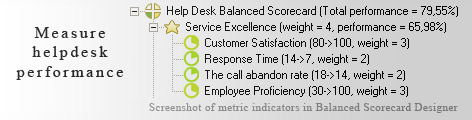
 The most important aspect of any business is customer relationships, if you can manage incoming requests, process them in a timely manner, then you will have a constant sales growth. Helpdesk plays a key role in this process. It is important to measure the performance of helpdesk as it is a good way to find out what is going bad in your customer support service. Keeping an eye on key performance metrics and improving your positions will return in a sales growth. With Help Desk Balanced Scorecard you will be able to take a control over Customer Satisfaction, Response Time, The call abandon rate, Reliability of Predefined Solutions, Resolution Excellence and helpdesk key performance indicators.



Read Why do business professionals choose ready-to-use KPIs? to find out the answers to these questions:

Ideally, you need to have a strategy (in a form of a strategy map) before you start thinking about the ways to measure its execution (KPIs). Don't have a strategy map yet? Use free Strategy Map Wizard to create a strategy map for your current business challenges. The wizard will:
The whole process takes on average 6 minutes. Give it a try right now - it's free.
 bonus.
Help desk makes up a prominent part of any organization's feedback system. It holds an even significant place in case the act of buying the product or subscribing to service requires some installation. Such a service brings a sense of 'caring' to the customers, therefore draws the clients time and again to the shop.
The responsibility carried forward by this section of an organization's operations is that of providing information assistance regarding the organizational resources. Such troubleshooting can decide the repute built by the firm among its clients.
Some of the ways by which this follow-up service can be offered are 'e-mail', 'website' and 'toll-free number'. Help desk software are installed to enable the task go in a flawless manner and offer help to customers on 'real-time' basis. Promptness and fast pace are the characteristics that can set a given industrial player tower above the rest of the competitors.
Counting on the efforts and steps of service desks can be made possible by opting for a balanced scorecard for the purpose. One can put down the useful metrics on it and keep visiting those in cyclic manner to make sure that everything is well within control.
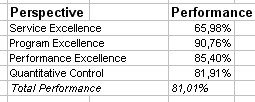
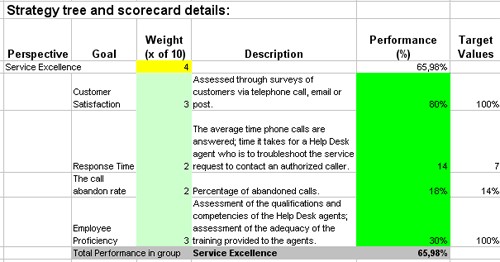
This is the actual scorecard with Helpdesk Metrics and performance indicators. The performance indicators include: First Time Settlement, Resolution Time, Opened tickets, The call abandon rate.
Download a trial version of Help Desk Balanced Scorecard or purchase a full version online.
How is this book different from 796 other book titles about KPIs on Amazon?
"Before writing a single line, I formulated some guiding principles, one of them was: "If our clients ask, "How can I find a good KPI for..." - I want this book to provide a perfect answer."